
Using Chismoso
Clips and timelapses
Save real-time clips and timelapses of one or many cameras — from the timeline or the Timelapse tab — and manage the exports on your Frigate server.
Chismoso can turn any stretch of recordings into a video file: either a clip at normal speed or a timelapse that squeezes hours into seconds. Frigate does the rendering on the server; Chismoso queues the work, follows the progress, downloads the finished files, and can tidy up afterwards.
From the timeline
The quickest way: on the timeline, press ✂ Clip (or Shift-drag) to select a range, then:
- Save clip saves the range at normal speed, one file per camera in view (one in the camera view, every camera in the grid). It starts right away.
- Timelapse… opens the Timelapse tab with those cameras and that range filled in, so you can pick a length and speed first.
From the Timelapse tab
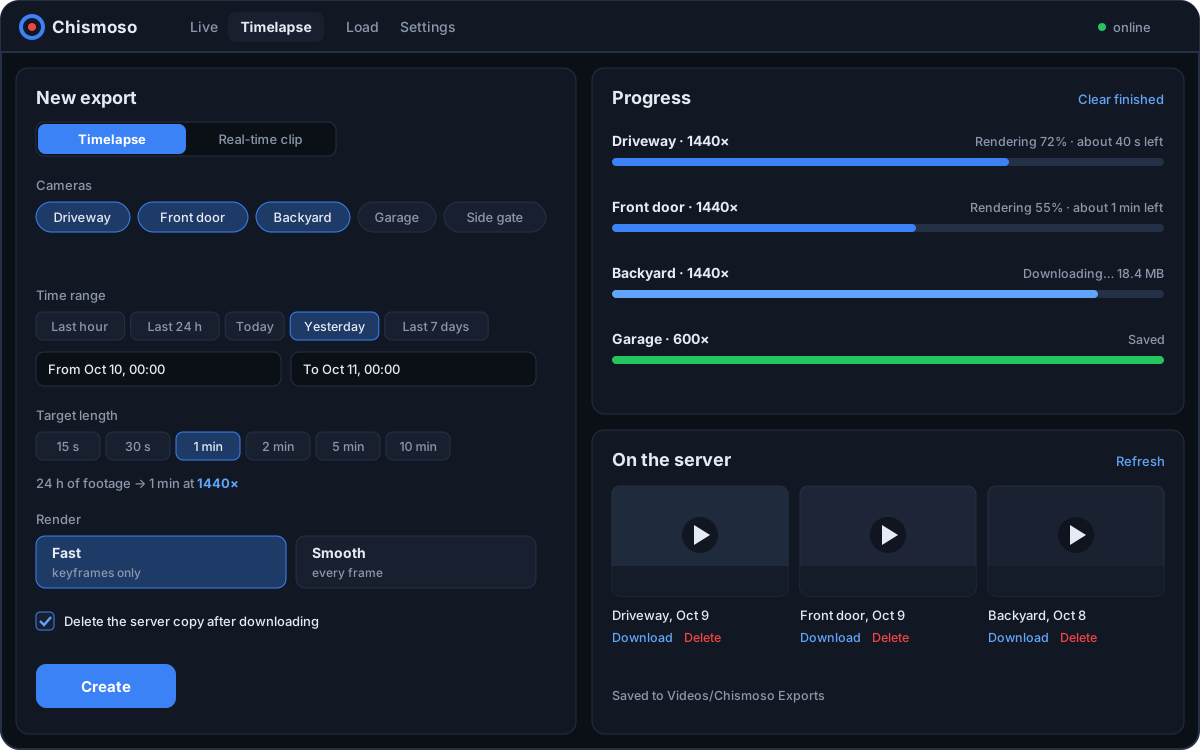
The New export form has everything:
- Timelapse or Real-time clip at the top.
- Cameras: tick one or more (All / None to speed things up).
- Time range: set From and To, or use a preset: Last hour, Last 24 h, Today, Yesterday, Last 7 days.
- Length (timelapses only), either way round:
- Target length: how long the finished video should be, from 15 seconds to 10 minutes. Chismoso works out the speed.
- Speed: set it directly, anywhere from 2× to 3600×, with presets from 10× to 1440×. 1440× turns a day into a minute.
- Render: Fast or Smooth (below).
- More options: the frame rate of the finished video (30 fps by default).
- Save to: the folder downloads go to.
- Delete the server copy after downloading, if you don't want the export to stay on Frigate.
The form shows how long the result will be before you start. Press Create.
Fast or Smooth
| Render | What Frigate decodes | Best for |
|---|---|---|
| Fast (default) | Only keyframes, about one every 1–2 seconds of footage | Speeds of 60× and up |
| Smooth | Every frame | Slow timelapses, where every frame shows |
At high speeds most frames are thrown away anyway, so Fast looks the same and is many times quicker: in testing, 11× faster with an identical result. Below 60×, motion can look jumpy with keyframes only, and Chismoso warns you and suggests Smooth.
Several cameras in parallel
All the cameras you pick are sent to Frigate at once. Frigate renders up to record.export.max_concurrent of them at the same time (3 by default); the rest wait their turn. If your server has headroom, raise it in Frigate's config:
record:
  export:
max_concurrent: 4Following progress
The Progress list shows each camera's job: queued, rendering (with a percentage, the elapsed time and an estimate of the time left), downloading, and saved. If Frigate's queue is full, the job waits and says so. Clear finished tidies the list.
Where files go
Downloads go to the Save to folder. By default that's a Chismoso Exports folder in your Videos folder (or Downloads, or your home folder, if there's no Videos folder). Use Open to show it in your file manager.
Exports on the server
On the server lists the exports stored on Frigate, including ones made from Frigate's own web page. For each one you can:
- Play it inside Chismoso,
- Download it to your Save to folder,
- Delete it from the server (you'll be asked first).
Exports that are still rendering show as Rendering…. Press Refresh to update the list.
Older Frigate versions
Frigate 0.17 and newer accept any timelapse speed. Older versions only offer 25×; Chismoso tells you when that's the case.
From the command line
The same export engine works without opening the window, for scripts and scheduled jobs. See Command line.